Monitorständer für den Schreibtisch: Warum ein Monitorständer zur Infrastruktur gehört und kein Holzregal ist.

Die meisten Käufer, die einen Monitorständer für den Schreibtisch suchen, suchen eigentlich zwei Zoll Höhe. Sie stellen sich eine Walnussplatte oder ein gebogenes Stahlregal vor, schieben den Bildschirm nach oben und nennen den Schreibtisch „aufgeräumt“. Das ist ästhetische Subtraktion. Das Durcheinander ist immer noch da, nur unter einer schöneren Oberfläche gestapelt. Ein Monitorständer ist keine dekorative Erhöhung, auf die Sie einen Bildschirm stellen; er ist das eine Stück Schreibtisch-Hardware, das genau an der Schnittstelle von Ergonomie, Stromversorgung und Kabelführung sitzt. Als Infrastruktur behandelt, erfüllt er drei Aufgaben gleichzeitig. Als Möbelstück behandelt, erledigt er eine Aufgabe schlecht und überlässt die anderen beiden einem Kabelsalat hinter Ihrem Schreibtisch. Das Hexcal Studio wurde unter Berücksichtigung dieser Unterscheidung entwickelt, und dieser Leitfaden führt Sie durch die drei Phasen, die einen echten Workstation-Kern von einem Regal unterscheiden.
Wichtige Erkenntnisse
- Ein Monitorständer für den Schreibtisch löst drei Probleme: Sichthöhe, Stromversorgung und Kabelverdeckung, und eine einfache Holzerhöhung adressiert nur das erste.
- Die OSHA-Richtlinien für Arbeitsplätze besagen, dass der obere Rand des Bildschirms auf oder leicht unter Augenhöhe liegen sollte, wobei die Mitte 15 bis 20 Grad unter der Horizontalen liegt. Eine feste Erhöhung trifft dies nur für eine bestimmte Monitorgröße und eine bestimmte Person.
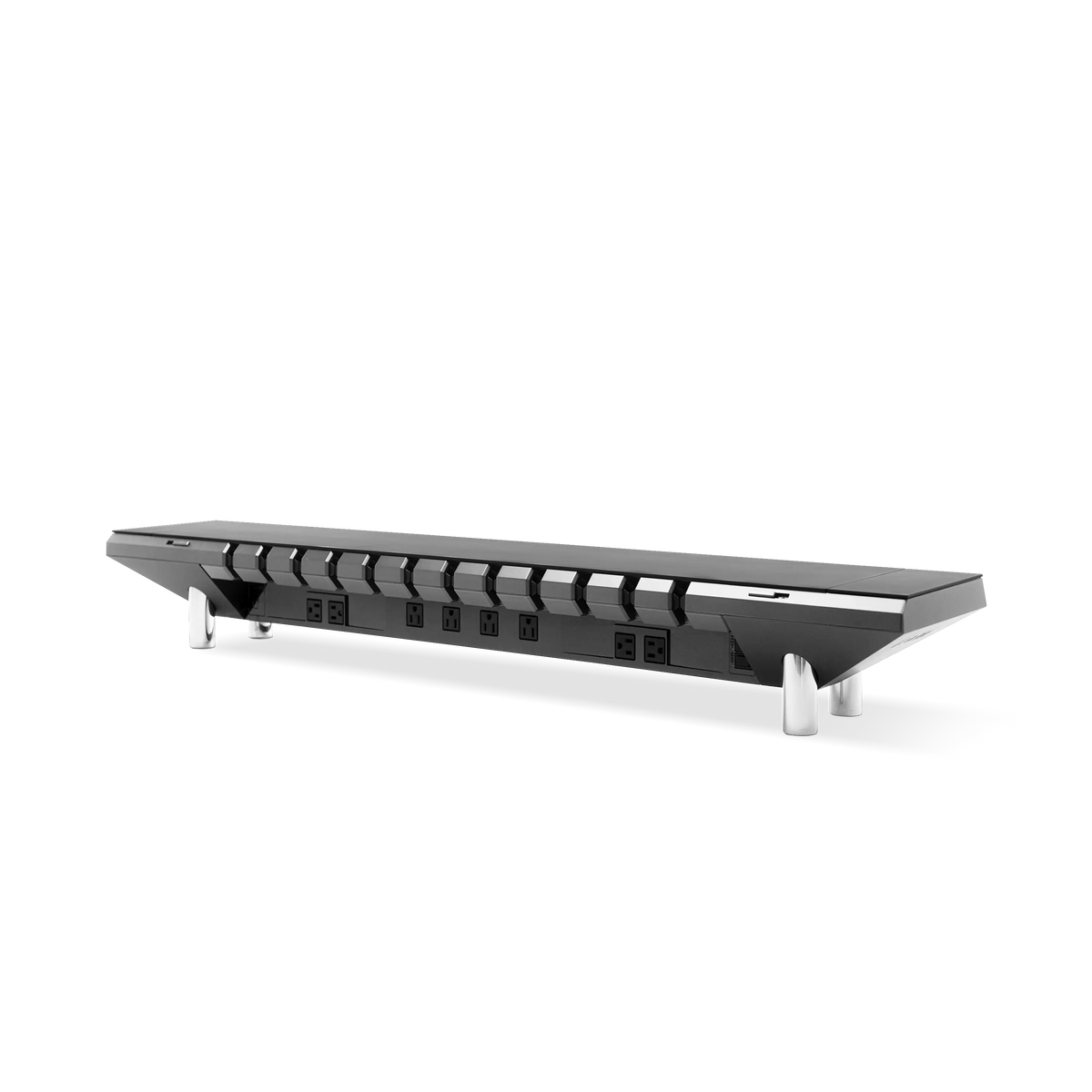
- Ein integrierter Ständer wie das Hexcal Studio führt Strom und Daten durch ein einziges Gehäuse, sodass die „aufgeräumte“ Oberfläche aufgeräumt bleibt, anstatt ein Chaos darunter zu verbergen.
- Wählen Sie eine Erhöhung, wenn Sie nur Höhe wünschen und die Kabel nie wieder berühren möchten. Wählen Sie einen integrierten Ständer, wenn der Schreibtisch eine tägliche Arbeitsfläche ist, die Strom am Deck benötigt.
- Dieser Ansatz passt nicht zu einem schwebenden Wandregal ohne nutzbare Unterseite. Diese Einrichtung benötigt stattdessen einen Klemmarm.

Phase 1: Heben, Ergonomie ist ein Bereich, keine feste Höhe
Die erste Aufgabe jedes Monitorständers für den Schreibtisch ist es, den Bildschirm dorthin zu bringen, wo Ihr Nacken ihn haben möchte. Laut dem eTool für Computerarbeitsplätze der OSHA sollte der obere Rand des Monitors auf oder leicht unter Augenhöhe liegen, wobei die Bildschirmmitte 15 bis 20 Grad unter der Horizontalen und ein Betrachtungsabstand von 20 bis 40 Zoll beträgt. Das ist ein präzises Ziel, und genau hier versagen feste Erhöhungen. Ein stabiles Holzregal fügt eine Höhe hinzu, sagen wir zwei Zoll, was für eine Monitorgröße und die Augenhöhe einer Person im Sitzen korrekt ist. Ändern Sie den Monitor, ändern Sie den Stuhl oder teilen Sie sich den Schreibtisch, und diese feste Höhe ist nun falsch.
Deshalb behandeln wir das Heben als ein Bereichsproblem und nicht als ein Plattenproblem. Das Hexcal Studio hält den Bildschirm in einer bestimmten Höhe und hält die darunter liegende Fläche nutzbar. Für Setups, die eine echte Einstellbarkeit benötigen, ist der Einzelmonitorarm für Bildschirme bis 35 Zoll und 3 bis 11 kg ausgelegt, mit einem Neigungsbereich von +60 bis -60 Grad, sodass Sie den Winkel an Ihre tatsächliche Augenhöhe anpassen können, anstatt sich auf die Schätzung des Herstellers zu verlassen.

Phase 2: Strom, die Erhöhung ist der Ort, an dem Ihre Kabel bereits zusammenlaufen
Schauen Sie, wohin jedes Kabel auf Ihrem Schreibtisch führt. Die Strom- und Videokabel des Monitors, das Laptop-Ladegerät, die Dockingstation und die Schreibtischlampe laufen alle an der Rückseite des Bildschirms zusammen. Dieser Konvergenzpunkt ist die wertvollste Immobilie auf dem Schreibtisch, und ein Holzregal verschwendet sie. Ein Monitorständer für den Schreibtisch, der die Stromversorgung ignoriert, zwingt Sie, eine separate Steckdosenleiste auf dem Boden zu verwenden, was genau das Durcheinander ist, das das „aufgeräumte“ Regal eigentlich beheben sollte.
Die Integration der Stromversorgung in den Ständer ist der Schritt, den Konkurrenten, die Walnussregale und blanke Stahlhöhen bauen, strukturell nicht vollziehen können. Die integrierte Strombrücke des Hexcal Studio Plus bringt Steckdosen und USB an das Deck, wo sich die Geräte befinden, sodass ein Telefon, eine Tastatur und eine Dockingstation alle an der Oberfläche geladen werden, anstatt sich zum Boden zu schlängeln. Der praktische Gewinn ist nicht das Datenblatt. Es ist, dass die freie Buchse dort ist, wo Ihre Hand bereits ist, nicht auf dem Boden hinter dem Schreibtisch.

Phase 3: Verbergen, Kabel verstecken ist der Punkt, an dem Erhöhungen leise versagen
Das Verstecken ist die Phase, die entscheidet, ob ein Schreibtisch in Woche zehn aufgeräumt bleibt oder nur in Woche eins aufgeräumt aussah. Eine flache Erhöhung hat keine Kammer, um etwas zu verstecken; die Kabel hängen sichtbar über die hintere Kante. Ein als Infrastruktur gebauter Ständer hat einen Führungsweg, einen Serviceschlauch, in den die Kabel zwischen Bildschirm und Deck verschwinden. Dies ist der Unterschied zwischen Kabelmanagement, das Sie einmal durchführen, und Kabelmanagement, das Sie jedes Mal neu durchführen, wenn Sie ein Peripheriegerät hinzufügen.
Wenn Sie tiefer in die Logik der Kabelführung selbst eintauchen möchten, deckt unser Leitfaden für Schreibtisch-Kabelmanagement den vollständigen phasenweisen Ansatz ab. Die Kurzfassung für einen Monitorständer: Jedes Kabel sollte einen eindeutigen Ausgang haben, nicht einen Fächer von losen Enden. Das Gehäuse des Studios wurde so konzipiert, dass die Strom-, Video- und USB-Leitungen diesen einen Ausgang gemeinsam nutzen, anstatt um die hintere Kante eines Regals zu konkurrieren.
Die strukturelle Realität: Eine Erhöhung trägt Last, also baue sie so, wie sie es tut
Ein Monitor ist kein Dekorationsobjekt, und der Ständer darunter ist ein tragendes Bauteil. Ein 32-Zoll-Panel plus sein Sockel ist eine echte Masse, die über eine dünne Regalplatte ragt, und eine weiche Holzerhöhung biegt sich unter ihr mit der Zeit durch. Hier bricht die „Möbel“-Definition zusammen. Für schwerere oder ultrabreite Bildschirme ist ein festes Regal das völlig falsche Werkzeug. Der Hexcal Heavy Duty Monitor Arm ist für Displays bis zu 57 Zoll und eine Flachbildschirm-Last von 2 bis 27 kg (22 kg gebogen) ausgelegt, mit VESA-Unterstützung bis zu 200x200, eben weil diese Masse eine strukturelle Halterung benötigt, keine Planke.
Die ehrliche Grenze hier: Dieses Produkt erfordert zwei Personen für die Installation und ist für einzelne große Displays gebaut. Für zwei, drei oder vier Bildschirme ändert sich die Lastberechnung erneut und das Monitor-Montagesystem ist die richtige Antwort. Eine gute Käuferfrage ist nie „welche Erhöhung am schönsten aussieht“. Sie lautet „welche Last lege ich tatsächlich darauf, und ist die Unterstützung dafür ausgelegt.“

Erhöhung vs. Integrierter Ständer: Ein schneller Vergleich
Der Markt teilt sich sauber in zwei Philosophien. Eine verkauft eine Oberfläche; die andere verkauft ein System. Keine ist für jeden Schreibtisch falsch. Sie beantworten unterschiedliche Fragen.
| Dimension | Einfache Holz-/Stahlerhöhung | Integrierter Ständer (Hexcal Studio) |
|---|---|---|
| Sichthöhe | Fest, eine Größe | Konstruierte Sitzhöhe + Armoptionen |
| Strom am Deck | Keiner, benötigt separate Steckdosenleiste | Eingebaute Strombrücke (Studio Plus) |
| Kabelverdeckung | Hängt über die Hinterkante | Kabelkanäle mit einem Ausgang |
| Lastaufnahme | Biegt sich unter schweren Paneelen | Konstruiertes Chassis; Arm für >27 kg / Ultrawide |
| Am besten für | Leichter Bildschirm, nur Höhe | Täglicher Arbeitsschreibtisch, der Strom + Kabelführung benötigt |

Wer was kaufen sollte
Zur Transparenz: Hexcal Studio, Studio Plus und die Monitorarm-Linie sind Produkte, die wir entwerfen und bauen. Dies ist keine neutrale Dritthersteller-Zusammenfassung, und die Empfehlungen hier bevorzugen einen integrierten Ansatz, da dies das Problem ist, das das Unternehmen lösen wollte. Mit dieser klaren Aussage ist hier die ehrliche Aufteilung. Wenn Ihr Bildschirm leicht ist, Sie ihn nie neu konfigurieren und Sie wirklich nur zwei Zoll Höhe wünschen, ist eine einfache Erhöhung eine gute, günstige Antwort, und Sie sollten nicht zu viel für Infrastruktur bezahlen, die Sie nicht nutzen werden.
Wenn der Schreibtisch eine tägliche Arbeitsfläche ist, stromhungrig, peripheriegeräteintensiv, geteilt oder einfach nur etwas, das Sie über den ersten Monat hinaus ordentlich halten möchten, dann hat ein Monitorständer für den Schreibtisch, der Heben, Stromversorgung und Verbergen integriert, seinen Platz verdient. Dies ist der Anwendungsfall, für den das Hexcal Studio Plus gebaut wurde, und es ist derjenige, der es wert ist, genau angesehen zu werden, bevor Sie sich mit einem Regal zufriedengeben.
Letzter Gedanke
Ein Monitorständer ist nicht das letzte Zubehör, das Sie einem Schreibtisch hinzufügen; es ist das erste Stück Infrastruktur, um das Sie den Schreibtisch herum bauen. Das Holzregal und der Ingenieur-Ständer sind keine kurzlebigen technischen Accessoires, die sich im Aussehen messen. Einer ist Dekoration, der andere ist das Chassis, auf dem Ihre Workstation läuft. Wenn der Ständer nicht mehr etwas ist, auf das Sie einen Bildschirm stellen, sondern zu dem Ort wird, an dem Strom, Höhe und Kabelführung zusammenlaufen, hört der Schreibtisch auf, zufällig ordentlich zu sein, und wird durch Design ordentlich.
Vom Hexcal-Team.