Monitor Stand vs Monitor Arm: Which to Choose for Your Desk

Most people settle the monitor stand vs monitor arm question by scrolling through desk photos and copying whichever setup looks cleanest. The conventional buying advice has this backwards. A clean photo tells you nothing about whether a mount will actually fit your screen, hold your desk, or sit at a height your neck can tolerate for eight hours. The choice is set by three things you can measure before spending anything: the mounting pattern on the back of your display, how your desktop is built, and how often your screen genuinely needs to move. Get those right and the decision resolves itself. A mount is infrastructure you buy once, not a trend-driven add-on, so it is worth choosing on evidence rather than aesthetics. And if your answer turns out to be neither, a fixed riser like the Hexcal Studio is the third option most comparisons forget.
Key Takeaways
- A monitor arm requires a VESA-compatible display; most 24–32" monitors use the VESA 75×75 or 100×100 mm pattern, but many thin or budget panels ship with no VESA holes at all, and those can only use a stand.
- A monitor stand reclaims desk depth and can add storage or power; a monitor arm reclaims the footprint entirely and lets the screen float, tilt, and swivel.
- Desk construction decides mountability: clamp mounts need a flat rear edge (the Hexcal Single Monitor Arm fits 10–80 mm by clamp, 10–35 mm by grommet), and floating or glass desks often take neither.
- Choose an arm if you reposition daily, run dual or triple screens, or want the desk surface back; choose a stand if your screen rarely moves or your display has no VESA mount.
- Price scales with capability: entry arms start around $79, heavy-duty arms around $129, bare risers run roughly $20–60, and a workstation-grade riser like the Hexcal Studio sits at $899.
- Ergonomics is the tiebreaker: guidance from Oregon OSHA puts the top of the screen at or just below eye level, about an arm's length away; both solutions can hit this, but only an arm re-adjusts on the fly.

What a Monitor Stand Actually Solves
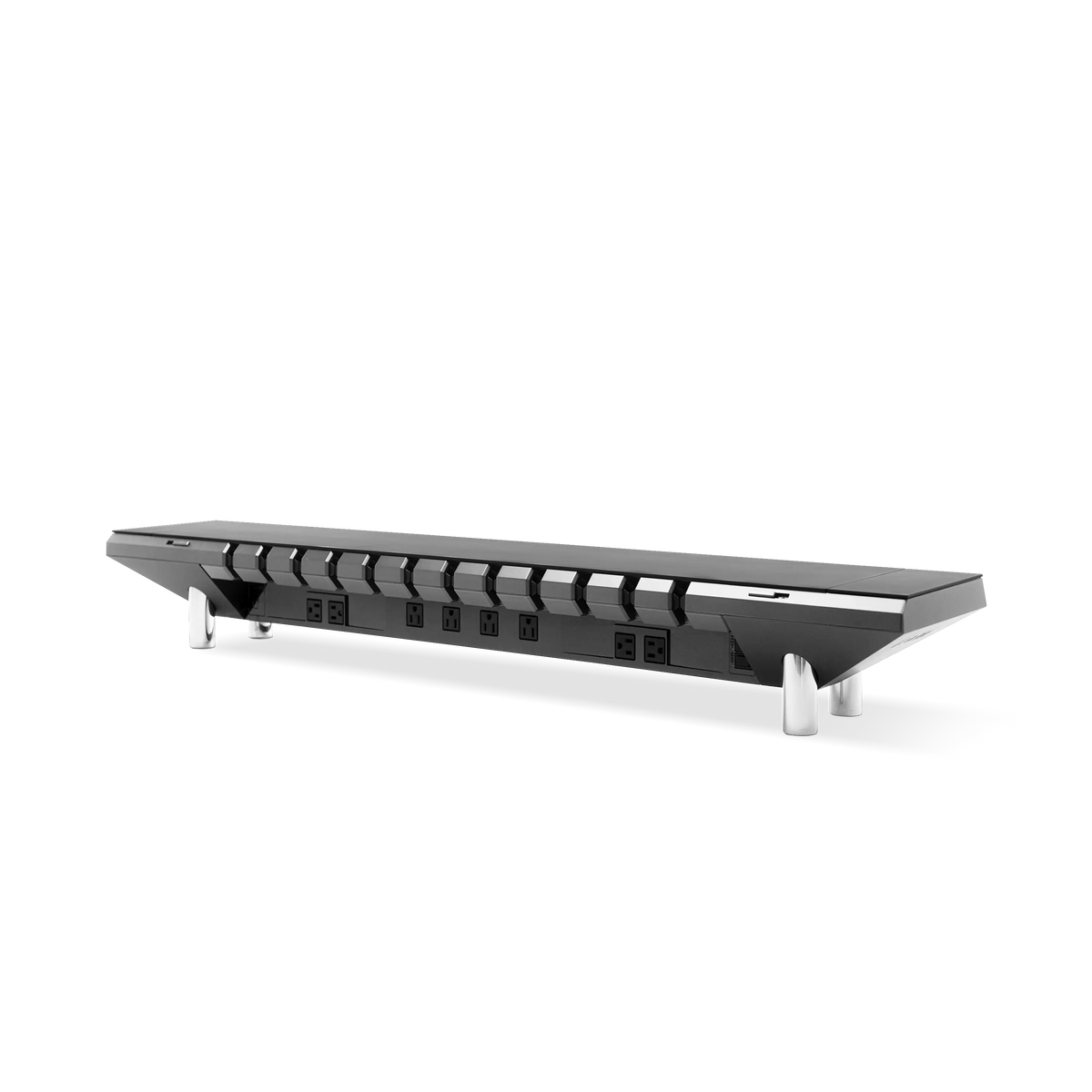
A monitor stand, also called a riser, sits on the desk and lifts the screen by a fixed amount. Its job is not decoration. It does three concrete things: it raises the panel toward eye level, it reclaims the desk depth beneath the screen, and on integrated models it consolidates the clutter a desk accumulates. A bare riser gives you the height and little else. A workstation-grade stand goes further: the Hexcal Studio treats the riser as infrastructure, folding cable routing, 1,440 W of distributed power, and adjustable task lighting into the same chassis the monitor sits on, with a surface rated to 101 lb (46 kg). The trade is honesty about motion. A stand holds one position: you set the height once, and that is the height you get.
This is the right tool more often than the desk-photo crowd admits. A display that lives in one spot, a monitor with no mounting holes, or a desk you would rather not drill into all point to a stand. The riser also doubles as a shelf, which is why "desk shelf" and "monitor riser with storage" searches keep climbing.

What a Monitor Arm Actually Solves
A monitor arm bolts to the back of the display through its VESA holes and cantilevers it off a clamp or a through-desk grommet. The screen floats. That single fact drives every advantage: the desk footprint under the monitor disappears, the panel moves through height, tilt, and swivel, and a second or third screen can share the same anchor point. A gas-spring counterbalance arm holds whatever position you set it to mechanically, so the spring does the work rather than friction, and the screen stays put between adjustments.
The catch is that an arm is only as compatible as your monitor and your desk allow. No VESA pattern, no arm. No flat clamp edge or grommet access, no easy mount. Those are not edge cases; they are the first two questions to ask, which is exactly what the framework below does.

The Three-Constraint Framework
Treat the purchase as a compatibility problem, not a style problem. Three constraints, checked in order, eliminate the wrong answers before taste enters the room. Each one is something you can confirm with a tape measure and your monitor's spec sheet.
Constraint 1: Does Your Monitor Have a VESA Mount?
This is the hard gate for monitor arms. The Video Electronics Standards Association's Flat Display Mounting Interface (FDMI) standard defines the bolt patterns on the back of a display. The common one, VESA MIS-D, specifies a 75×75 mm or 100×100 mm hole pattern and covers most standard monitors. Larger and heavier panels move to wider patterns such as MIS-E (200×100 mm) or MIS-F (200×200 mm and up). The Hexcal Single Monitor Arm targets the 75×75 and 100×100 range for displays up to 35" and 3–11 kg; the Hexcal Heavy-Duty Monitor Arm extends to 200×200 and a 27 kg flat or 22 kg curved load for displays up to 57".
Here is the boundary the marketing photos hide: plenty of slim, design-forward, and budget monitors ship with no VESA holes at all, or hide them behind a non-removable factory stand. If your display has no usable VESA pattern, the arm question is closed, and a stand or riser is your only path. Check the back of the panel, or its spec sheet, before anything else.
Constraint 2: How Is Your Desk Built?
An arm has to grab something. The two standard mechanisms are a clamp that bites the rear desk edge and a grommet that drops a post through a hole in the surface. Both depend on physical facts about your desk. The Hexcal Single Monitor Arm clamps desks 10–80 mm thick and grommet-mounts surfaces 10–35 mm thick; the Heavy-Duty arm clamps 10–45 mm and grommet-mounts 10–60 mm. Measure your tabletop edge before you assume it fits. Glass tops, thin floating shelves, and wall-cantilever desks frequently fail both tests: too thin, too fragile, or no accessible rear edge.
A monitor stand sidesteps all of this. It sets its full weight on the surface and asks nothing of the desk's structure or edge. For renters who cannot drill, for desks with finishes they refuse to clamp-scar, or for setups where a tidy run of desk cable management matters more than a floating screen, the stand wins on installation alone.
Constraint 3: How Much Does Your Screen Move?
Motion is where ergonomics and product type collide. Oregon OSHA's computer workstation guidance places the top of the screen at or slightly below eye level, with the main viewing area a little below straight-ahead and the display about an arm's length away. The practical takeaway is that comfortable viewing is a range, not a single magic height, and your ideal position shifts with your chair, your posture, and whether you sit or stand.
A fixed stand nails one good position and keeps it. That is plenty if you sit the same way every day at a fixed-height desk. The moment you add a sit-stand routine, share the desk, or switch between focused work and a video call, the screen needs to follow you, and only an arm re-adjusts on the fly. The Hexcal Single Monitor Arm offers +60°/–60° tilt and +90°/–90° swivel with 483 mm (19") of reach, precisely so the panel can track your gaze through the day instead of forcing your neck to compensate.
Stand vs Arm: The Specs Side by Side
Run your answers through the three constraints, then use the numbers to size the actual product. This table compares a fixed riser against the two arm classes on the dimensions that decide the purchase, with all Hexcal figures taken from the current product specs.
| Dimension | Fixed riser (Hexcal Studio) | Single Monitor Arm | Heavy-Duty Monitor Arm |
|---|---|---|---|
| Price (USD) | $899 workstation riser (bare risers ~$20–60) | $79.20 | $129 |
| Screen size | Any (sits beneath the screen) | Up to 35" | Up to 57" ultrawide |
| Load rating | 101 lb (46 kg) surface | 3–11 kg (6.6–24 lb) | 27 kg flat / 22 kg curved |
| VESA required | None | 75×75 / 100×100 | 75×75 up to 200×200 |
| Desk footprint | Occupies depth under screen; adds storage, power, lighting | Freed; screen floats | Freed; screen floats |
| Adjustability | Fixed height, set once | Tilt +60/−60°, swivel +90/−90°, 483 mm reach | Tilt +60/−20°, swivel +90/−90° |
| Desk mounting | Rests on surface, none needed | Clamp 10–80 mm / grommet 10–35 mm | Clamp 10–45 mm / grommet 10–60 mm |
| Install | Place on desk, no tools | One person | Two people |

Which One Fits Your Situation
The specs tell you what each option can do; this table maps the common real-world setups to the better fit. Find the row that matches your desk and read across.
| Your situation | Better fit | Why |
|---|---|---|
| Monitor has no VESA holes | Stand / riser | An arm physically cannot attach |
| Single screen, rarely moved, fixed-height desk | Stand / riser | One good position is all you need, plus bonus storage and cable routing |
| Renter or no-drill, no-clamp desk | Stand / riser | Sets on the surface, asks nothing of the desk structure |
| Sit-stand routine or shared desk | Monitor arm | Screen follows your posture through the day |
| Dual or triple displays | Monitor arm | One anchor, full motion, footprint fully reclaimed |
| Large or heavy panel (34"+, curved, ultrawide) | Heavy-duty arm | Needs a wider VESA pattern and higher load rating (up to 200×200, 27 kg) |

Where Hexcal Fits, and Where It Does Not
Full disclosure: Studio, the Single Monitor Arm, and the Heavy-Duty Monitor Arm are all Hexcal-designed and built, so read this section as the maker explaining its own range rather than an independent review. Hexcal builds for both answers because both answers are correct depending on your constraints. If the framework points you to a fixed position with integrated storage, power, and lighting, the Hexcal Studio is the riser built for that at $899. If it points you to motion, the Single Monitor Arm covers 75/100 VESA displays up to 35" for $79.20, and the Heavy-Duty Monitor Arm steps up to 200×200 VESA and a 27 kg flat load for larger panels at $129.
The boundaries matter as much as the fit. An arm from anyone, Hexcal included, will not help a monitor with no VESA mount, a glass desktop too thin to clamp, or a floating shelf with no rear edge. A riser will not give you sit-stand tracking or reclaim the footprint under the screen. Match the tool to the constraint, not to the photo. If you are unsure which way you lean, start by measuring your VESA pattern and your desk-edge thickness, then weigh the Single Monitor Arm, the Heavy-Duty Monitor Arm, or the Hexcal Studio against those two numbers.

Final Thoughts
A monitor stand and a monitor arm are not rivals competing for the same job. They are two answers to one question: how should this screen be held? The right answer is dictated by your display's VESA back, your desk's construction, and how much your screen has to move. Choose the constraint, and the product chooses itself. The desk that works is not the one that looks like the photo; it is the one built around what you can measure, and built to last longer than the trend that inspired it.