Schreibtischorganisationsideen, die eine Arbeitswoche überstehen: 7 ingenieurtechnische Prinzipien

Die meisten "Schreibtisch-Organisationsideen" sind getarnte Vorratslisten. Achtundvierzig Tipps, jeder Schubladeneinsatz, jede Lochplatte, jeder "niedliche Kabelclip", und der Schreibtisch sieht am Mittwoch immer noch müde aus. Listicle-Autoren behandeln den Schreibtisch als Bastelprojekt, dabei ist der Arbeitstisch eine technische Oberfläche. Die Schreibtisch-Organisationsideen, die tatsächlich Bestand haben, beginnen nicht mit einer Schreibtischablage; sie beginnen mit der Strom-, Beleuchtungs- und Kabeltopologie unter der Oberfläche. Wenn die Infrastruktur stimmt, organisiert sich die sichtbare Oberfläche von selbst; wenn sie nicht stimmt, kann keine noch so große Anzahl von Stiftebechern helfen.
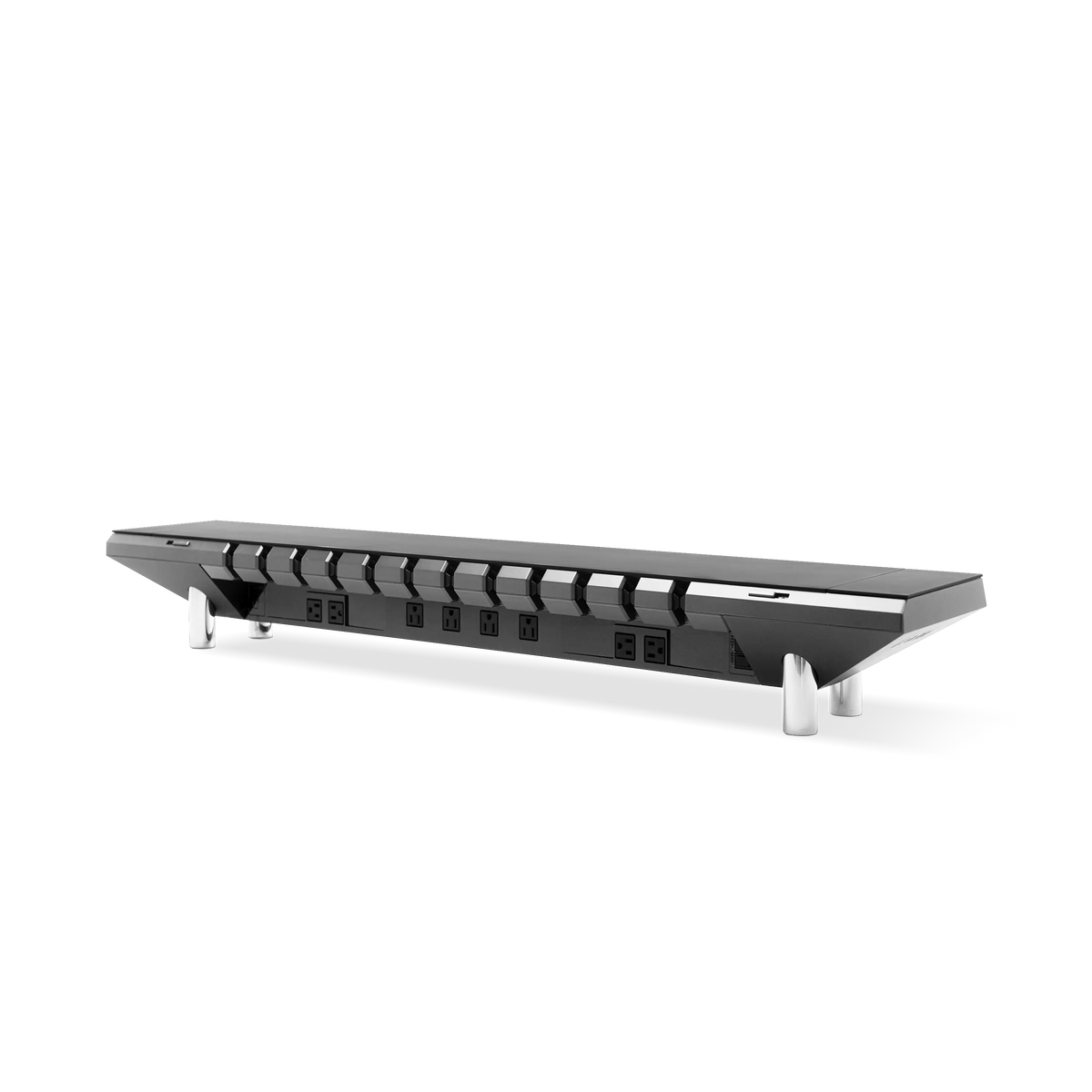
Dies ist keine Liste von Zubehörteilen. Es ist ein 7-Prinzipien-Rahmenwerk für den Aufbau eines Schreibtisches, bei dem Unordnung strukturell schwer zu erzeugen ist. Wir verwenden das Hexcal Studio (und das leistungsstärkere Silver Hexcal Studio Plus) als Arbeitsbeispiel, da es das einzige Produkt ist, das wir ausgeliefert haben und das Stromversorgung, Beleuchtung und Kabelführung in einer einzigen technischen Basis konsolidiert. Die Prinzipien sind auf jeden Schreibtisch übertragbar.
Wesentliche Erkenntnisse
- Listicle-Schreibtisch-Organisationsideen scheitern, weil sie Organisation als Dekoration behandeln; behandeln Sie sie als Infrastruktur, beginnend mit der Strom- und Kabelschicht unter der Oberfläche.
- Ein aufgeräumter Arbeitsplatz bleibt nur bestehen, wenn der Schreibtisch eine einzige Strom- + Kabelzentrale ist: 1.440 W verteilte Leistung (Studio) oder 160 W Type-C-Versorgung (Studio Plus) lassen den Kabelsalat von Steckernetzteilen verschwinden.
- Versteckte Kabelführung (3D-Kanäle, ein Kabelausgang) ist die Maßnahme mit dem höchsten ROI, noch vor jedem Schubladeneinsatz oder jeder Lochplatte.
- Überspringen Sie den Impulskauf von Gadgets. Infrastruktur in Investitionsqualität (FCC Klasse B, 45 kg Abdecklast) überdauert drei Zyklen trendigen Zubehörs.

Prinzip 1: Der Schreibtisch ist Infrastruktur, kein Möbelstück
Der häufigste Fehler bei Schreibtisch-Organisationsideen ist, den Schreibtisch als Möbelstück zu behandeln, auf dem man Gegenstände anordnet. Ein moderner Schreibtisch ist der physische Endpunkt von vier Systemen: Strom, Daten, Beleuchtung und menschliche Eingabe. Die sichtbaren Objekte (Laptop, Monitor, Tastatur, Notizbuch) sind nur die Lasten. Die traditionelle Liste beginnt bei den Lasten, "kaufe einen Stiftebecher, kaufe ein Tablett", und arbeitet rückwärts. Der ingenieurmäßige Ansatz beginnt bei den Systemen: Wo kommt der Strom herein, wo gehen die Kabel heraus, wo sitzt das Licht relativ zur Augenhöhe und wie verlässt die Wärme das Gehäuse.
Sobald man Kabelmanagement, Stromverteilung und Arbeitsplatzbeleuchtung als die ersten drei Aufgaben behandelt, wird das sichtbare Problem trivial. Eine einzige integrierte Plattform wie das 1.440W Hexcal Studio beseitigt den Strom- und Kabelsalat, der die Rückseite des Schreibtisches verunziert, den Teil, den die meisten Organisationsanleitungen nie behandeln. Wenn dieses Durcheinander verschwunden ist, wird aus "wo habe ich den SD-Kartenleser hingelegt" ein "alles hat seinen Platz", ohne ein einziges neues Zubehörteil.

Prinzip 2: Strom zentralisieren, oder den Oktopus akzeptieren
Schritt 1 jedes ernsthaften Projekts zur Schreibtischorganisation ist das Zählen der Netzteile. Ein typischer Schreibtisch eines Wissensarbeiters hat ein Laptop-Ladegerät (60–100W), ein Monitor-Netzteil (oft extern, 65–180W), ein Telefonladegerät (20W), ein kabelloses Ladepad (15W), einen Schreibtischlampen-Transformator und ein oder zwei Smart Plugs. Das sind sechs bis zehn Netzteile, jedes mit eigenem Kabel, jedes kämpft um eine der zwei oder drei Steckdosen hinter dem Schreibtisch.
Die Lehrbuchantwort lautet "kaufe eine Steckdosenleiste". Die technische Antwort ist, einen Schreibtisch mit einer eingebauten Strombrücke zu kaufen oder den Oktopus zu akzeptieren. Das Hexcal Studio Chassis nimmt 120V/12A am Eingang auf und verteilt bis zu 1.440W über horizontale Steckdosen, vertikale Steckdosen, USB-A Quick Charge, USB-A Standard und USB-C Power Delivery bis zu 27W. Das Silver Hexcal Studio Plus geht noch weiter: 160W Gesamtausgangsleistung mit einem 100W USB-C PD-Port (PD2), der ein 14-Zoll MacBook Pro mit einem einzigen Kabel lädt, plus vier DC 65W-Ports und zwei Qi 15W Wireless-Ladeflächen. Wenn die Anzahl der Netzteile von zehn auf eins sinkt, wird die Rückseite des Schreibtisches zu einem einzigen Kabel.

Prinzip 3: Kabel durch das Chassis führen, nicht darum herum
Die meisten Schreibtisch-Organisationsideen behandeln Kabel als ein sichtbares Problem und greifen zu Clips, Ablagen und Untertischkörben. Dies sind nachgelagerte Korrekturen. Die vorgeschaltete Korrektur besteht darin, Kabel durch die eigene Geometrie des Schreibtisches zu führen, sodass der Kabelweg durch das Chassis und nicht durch Ihre Disziplin an einem Dienstagnachmittag festgelegt wird. Dies ist der einzelne Zug mit dem höchsten ROI bei Schreibtisch-Organisationsideen, die den Namen verdienen.
Das Hexcal Studio's 3D Cord Organization System (patentiert) ist ein vertikaler Kanal an der Rückseite des Ständers, der den vollen Durchmesser eines Kaltgerätesteckers oder USB-C-Kabels aufnimmt und es in die darunterliegende Ablage fallen lässt, wo ein wiederverwendbares Band es fixiert. Jedes Kabel tritt an einem vorbestimmten Punkt ein und aus, und die sichtbare Oberfläche ist einfach kabelfreie Luft. Hier scheitern die meisten Schreibtisch-Organisationsideen still und leise: Heim-Setups versagen nicht, weil der Benutzer nachlässig ist, sondern weil nichts physisch verhindert, dass die Kabel von einem Clip rutschen. Ein Chassis mit einem eingebauten Kanal hat keinen solchen Fehlerfall.

Prinzip 4: Beleuchtung gehört in den Schreibtisch, nicht darauf
Eine der kontraintuitivsten Schreibtisch-Organisationsideen ist es, die Schreibtischlampe zu streichen. Eine moderne Arbeitsplatzbeleuchtung für einen 27-Zoll-Monitor benötigt typischerweise eine Lichtleiste, die oben am Bildschirm befestigt ist, ein Umgebungslicht dahinter und eine Schreibtischlampe für Papierarbeiten. Das sind drei Lichtquellen, drei Netzteile, drei Kabel und drei Einstellpunkte. Die Frage ist nicht "welche Lampe soll ich kaufen", sondern "wie bekomme ich alle drei in den Schreibtisch selbst".
Das Hexcal Studio wird mit einem schattenfreien LED-Feld mit über 1.000 Modi unter dem Regal geliefert, mit einstellbarer Breite und Farbtemperatur; ein warm-kalt-Verlauf deckt sowohl das Umgebungslicht als auch das Dokumentenlicht ab, und das Feld ist breit genug, dass ein Notizbuch im hinteren Bereich sauber gelesen werden kann. Das Silver Hexcal Studio Plus begrenzt das Feld auf drei benannte Modi (Warm, Kalt, Tageslicht) von 2.700K–6.500K, weniger Optionen, schneller zu wählen. In jedem Fall fallen Schreibtischlampe, Umgebungslicht und Monitorlichtleiste zu einer integrierten Quelle zusammen, wodurch drei Kabel an Platz gespart werden.

Prinzip 5: Oberfläche ist ein Budget
Sobald Strom und Beleuchtung in den Schreibtisch integriert sind, wird die sichtbare Oberfläche zu Ihrem primären Kapital. Behandeln Sie sie als ein Budget. Jedes Objekt ist eine Steuer: Es nimmt Platz ein, wirft einen Schatten, unterbricht die Blicklinie zum Monitor und muss abgestaubt werden. Die meisten Schreibtisch-Organisationsideen fügen immer mehr Zubehör hinzu, weil sie das falsche Ziel optimieren, "was soll ich auf den Schreibtisch stellen", anstatt "was soll ich entfernen".
Eine Arbeitsregel: Nichts auf der sichtbaren Oberfläche darf ein Kabel haben, es sei denn, dieses Kabel ist die einzige Möglichkeit, das Gerät zu verwenden. Telefone liegen auf dem kabellosen Ladepad (Teil des Studios, nicht auf dem Schreibtisch). Kopfhörer hängen an einem Haken unter dem Regal. Notizbücher liegen in einer einzigen geschlossenen Ablage hinten. Das Ergebnis ist eine größtenteils leere Oberfläche, und dieser leere Bereich ist es, was "aufgeräumter Arbeitsplatz" in der Praxis wirklich bedeutet, nicht die gestylte Pinterest-Version.

Prinzip 6: Materialien und Last sind die langweilige Grundlage
Die meisten Schreibtisch-Organisationsideen überspringen den Untergrund komplett. Eine Schreibtischunterlage, eine Filzauflage, ein Holzfurnier, das sind ästhetische Entscheidungen, keine organisatorischen. Aber der Untergrund entscheidet, wie viel Ausrüstung der Schreibtisch hält, bevor er versagt. Die Aluminiumabdeckung des Hexcal Studio ist für 46 kg statische Last auf der Oberfläche und 10 kg auf dem oberen Hauptrahmen ausgelegt. Das ist der Unterschied zwischen einem Schreibtisch, der einen 34-Zoll-Ultrawide plus einen Laptop plus ein Tablet ohne Durchbiegung hält, und einem, der sich mit der Zeit durchbiegt.
Wenn der Untergrund die Last tragen kann, können Sie sich keine Sorgen mehr machen, wohin die Dinge gehören, denn sie werden sich nicht bewegen. Ein Schreibtisch im mittleren Preissegment, der unter Monaten von Monitor-, Arm-, Laptop- und Dock-Gewicht durchhängt, bricht seine eigene Kabelkanalausrichtung und führt das Chaos wieder ein, das Sie zu organisieren versucht haben. Eine Tragfähigkeit von 46 kg, FCC Class B-Zertifizierung und ein Überstromschutz-Reset-Knopf sind keine glamourösen Spezifikationen, aber sie sind der Grund, warum ein auf dem Studio aufgebauter, aufgeräumter Arbeitsplatz auch im dritten Jahr noch aufgeräumt bleibt, nicht nur in der ersten Woche.
Prinzip 7: Überspringen Sie den Impuls-Gadget-Gang
Das letzte Prinzip, das einen investitionsfähigen Schreibtisch von einem gestylten Schreibtisch unterscheidet, besteht darin, die Impuls-Gadget-Pipeline abzulehnen. Die Listicle-Wirtschaft lebt von Affiliate-verlinkten Inhalten wie "Wir haben 14 Kabelclips getestet und diese sind die besten", die jedes Quartal einen neuen Gewinner hervorbringen. Keiner dieser Clips, Ablagen, Lochplatten oder Stiftehalter ist Infrastruktur. Sie sind Dekoration und werden nächstes Jahr veraltet sein. Die ernstzunehmenden Schreibtisch-Organisationsideen behandeln den Schreibtisch als langfristiges System, nicht als saisonale Auffrischung.
Das Isolierte Stromversorgungssystem des Hexcal Studio (separate INT für interne, EXT für Benutzergeräte) bedeutet firmware-upgradefähige Stromlogik ohne Neuverkabelung; die dualen kabellosen Ladeflächen unterstützen den Qi-Standard; die Beleuchtung ist softwaregesteuert statt LED-austauschbar. Dies sind die Merkmale von Infrastruktur, nicht von Zubehör. Die besten Schreibtisch-Organisationsideen sind diejenigen, die man nur einmal umsetzen muss. Überspringen Sie die Gadgets, kaufen Sie den Schreibtisch und lassen Sie ihn die Oberfläche für das nächste Jahrzehnt organisieren.
So wenden Sie die 7 Prinzipien diese Woche an
Sie müssen Ihren Schreibtisch nicht ersetzen, um dieses Framework anzuwenden. Beginnen Sie mit Prinzip 2: Zählen Sie die Netzteile, ersetzen Sie sie durch einen einzigen Multi-Port-Hub oder einen Schreibtisch mit einer integrierten Strombrücke wie dem Hexcal Studio und beobachten Sie, wie die sichtbare Unordnung von selbst verschwindet. Gehen Sie dann zu Prinzip 3 (Kabelführung durch das Gehäuse) und Prinzip 4 (Beleuchtung integrieren) über. Nach Prinzip 5 beantwortet sich die Frage nach dem Stiftebecher von selbst, was der ganze Sinn von Schreibtisch-Organisationsideen ist, die auf Infrastruktur statt auf Zubehör basieren.
Für eine vollständige Auffrischung ist das Silver Hexcal Studio Plus die sauberste Ein-Produkt-Antwort: 100W USB-C für ein 14-Zoll MacBook Pro mit einem Kabel, 4× DC 65W für Monitore und Hubs, duale Qi-Pads, dreimodige Arbeitsplatzbeleuchtung und eine 45 kg Aluminiumoberfläche, die die nächsten drei Monitor-Upgrades überdauert. Von allen Optionen in der Literatur über Schreibtisch-Organisationsideen ist es die beste "Einmal kaufen"-Lösung für einen aufgeräumten Arbeitsplatz.
Vom Hexcal-Team. Hexcal Studio und Silver Hexcal Studio Plus sind von Hexcal entworfen und gebaut. Dieses Framework ist für Schreibtische mit stabilen Montageflächen unter dem Schreibtisch gedacht; schwimmende Schreibtische ohne Rückwand werden vom integrierten Kabelkanal in Prinzip 3 nicht unterstützt, und für diese bleiben auf der Oberfläche montierte Kabelkanäle die Ausweichlösung.