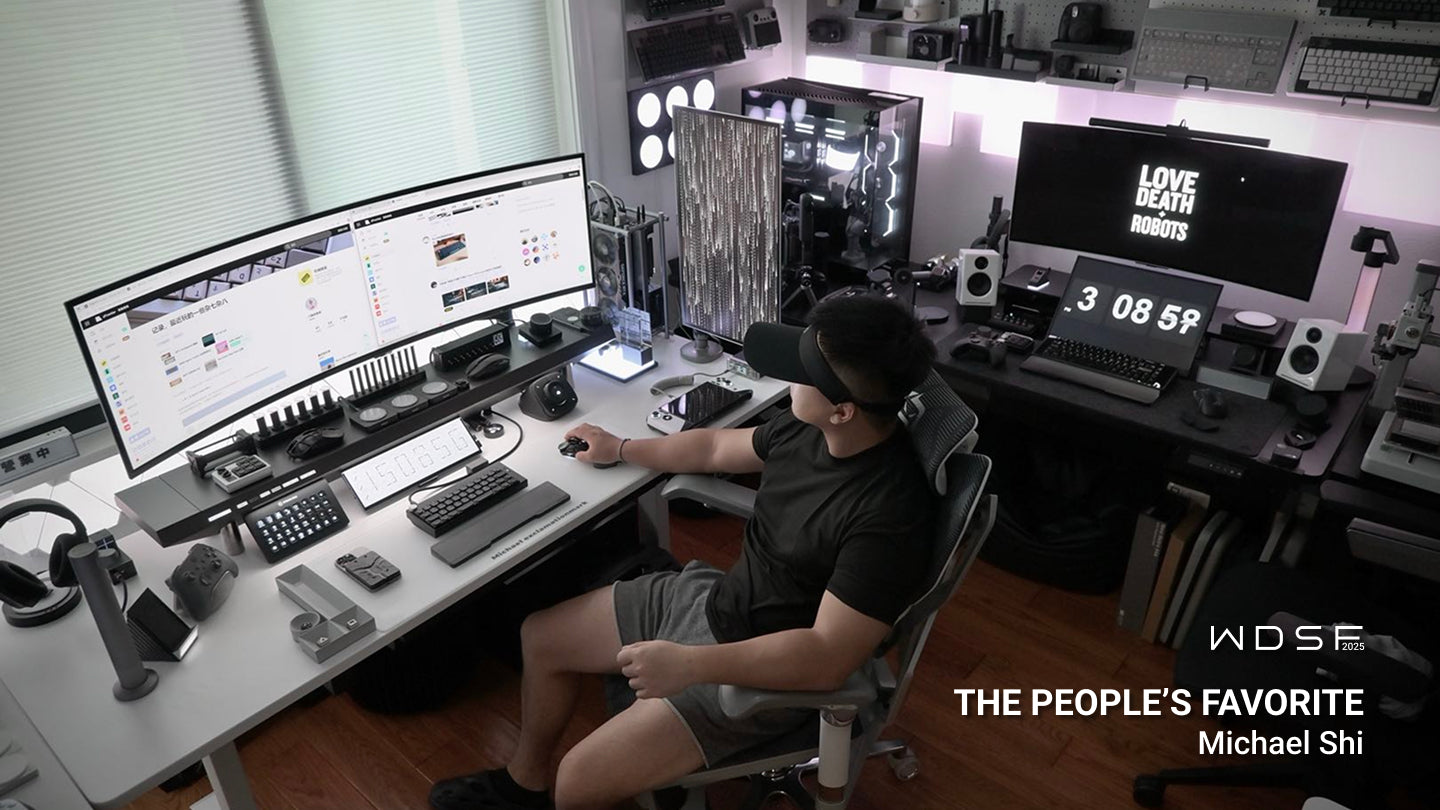
Die Kunst der Konzentration: Eine Meisterklasse für minimalistische Schreibtisch-Setups
Einleitung: Die Wissenschaft der kognitiven Ergonomie
Minimalismus am Arbeitsplatz wird oft fälschlicherweise als Trend verstanden. Tatsächlich ist er eine Strategie der kognitiven Ergonomie. Jedes herumliegende Kabel, jeder ungleichmäßige Schatten oder jede unordentliche Ecke wirkt wie eine „Mikro-Ablenkung“. Diese visuellen Reize konkurrieren um die neuronale Repräsentation im Gehirn, erhöhen die kognitive Belastung und beeinträchtigen die Fähigkeit, in einen Flow-Zustand zu gelangen. Um konzentriert arbeiten zu können, muss man ästhetische Einschränkungen überwinden und sich der strukturellen Gestaltung zuwenden. Das Ziel ist eine klare Arbeitsumgebung durch unsichtbare technische Integration.
Was ist kognitive Ergonomie?
Während sich die traditionelle Ergonomie auf physischen Komfort und Sicherheit konzentriert, ist die kognitive Ergonomie die Wissenschaft, wie die Arbeitsumgebung die mentalen Prozesse beeinflusst – insbesondere Gedächtnis, Wahrnehmung und Denkvermögen. Im Kontext eines Arbeitsplatzes spricht man von „mentaler Belastung“. Wenn Sie in einem Raum mit freiliegenden Kabeln, schlechter Beleuchtung oder Unordnung arbeiten, ist Ihr Gehirn ständig nur noch teilweise konzentriert. Ihr Unterbewusstsein erfasst permanent das Chaos um Sie herum, wodurch weniger Energie für die komplexe Problemlösung Ihrer eigentlichen Arbeit zur Verfügung steht. Durch die Nutzung eines integrierten Arbeitsplatzdesigns betreiben Sie „Umwelt-Offloading“. Sie delegieren die Organisation Ihrer Werkzeuge an das Hexcal-Ökosystem, sodass sich Ihr präfrontaler Cortex voll und ganz auf die jeweilige Aufgabe konzentrieren kann. Minimalismus ist in diesem Sinne das ultimative Werkzeug für kognitive Effizienz.

Die Basis: Der Schreibtisch als hochpräzises Chassis
Eine professionelle Schreibtischorganisation beginnt mit der Oberfläche. Wenn Ihre Basis fehlerhaft ist – wenn sie Licht in Ihre Augen reflektiert oder während der Benutzung wackelt – wird Ihr Setup niemals echten Minimalismus erreichen.
Der Hexcal Elevate Stehschreibtisch
Der Elevate wurde als hochpräzises Chassis für Ihre gesamte Technik-Ausstattung entwickelt.
- Oberflächentechnologie: Im Gegensatz zu herkömmlichen Laminat-Schreibtischen, die augenanstrengende Reflexionen verursachen, verfügt der Elevate über eine spezielle matte, nicht reflektierende Oberfläche. Diese Oberfläche wurde speziell entwickelt, um Blendeffekte zu eliminieren und die Präzision optischer Sensoren für High-End-Mäuse zu verbessern.
- Stabilität unter Last: Um auch mit schwerer Ausrüstung – wie z. B. 49-Zoll-Ultrawide-Monitoren – einen minimalistischen Look zu bewahren, benötigen Sie einen Schreibtisch, der nicht wackelt. Der Elevate nutzt ein hochbelastbares Doppelmotorsystem, das dafür sorgt, dass die Oberfläche auch in voller Stehhöhe absolut ruhig bleibt.
- Die Voraussetzung für absolute Wackelfreiheit: Stabilität ist der stille Partner des Minimalismus. Ein wackelnder Schreibtisch erinnert Sie an das Möbelstück; ein absolut stabiler Schreibtisch lässt das Möbelstück aus Ihrem Bewusstsein verschwinden.

Zentrale Infrastruktur: Schluss mit dem Kabelsalat
Das Herzstück jedes Kabelsalats ist die dezentrale Stromversorgung. Wenn jedes Gerät ein eigenes Kabel an eine andere Steckdose hat, ist optisches Chaos unvermeidlich. Ziel ist es, vom „Kabelmanagement“ zum „Komplettieren der Kabel“ überzugehen.
Das Hexcal Studio: Die Workstation-Brücke
Das Hexcal Studio ist ein wegweisendes Werkzeug, das als Kommandozentrale für Ihr integriertes Workspace-Design dient.
- Verteilung für 14 Geräte: Anstatt sich mit Kabeln zu unzähligen Steckdosen zu verheddern, wird jedes Gerät – vom Computer bis zum Smartphone – direkt an eine einzige Brücke angeschlossen. Dies umfasst AC-, DC- und kabellose Ladeanschlüsse.
- Das 100 cm große Verdeck: Das leistungsstärkste Merkmal des Studios ist sein internes Managementsystem. In diesem 101,6 cm großen Gehäuse lassen sich sperrige Netzteile, Adapter und überschüssiges Kabel komplett unsichtbar verstauen.
- Schattenfreie Beleuchtung – Ergonomie: Das Studio reduziert die Augenbelastung durch direktes Licht und Bildschirmreflexionen dank eines branchenführenden, indirekten Beleuchtungssystems mit einem Farbwiedergabeindex (CRI) von 95 % und 1280 möglichen Lichtkonfigurationen.
- Ein-Kabel-Lösung: Dies ist die ultimative Lösung für ein optimales Kabelmanagement. Mit dem Hexcal Studio wird Ihre gesamte Workstation über ein einziges, diskretes Kabel an die Stromversorgung angeschlossen.
Oberflächenoptimierung: Technik-Stacks anheben
Um zu den besten minimalistischen Schreibtisch-Setups zu gehören, müssen Sie den „negativen Raum“ – die leeren Bereiche eines Schreibtisches, die Ihnen mentale Freiräume schaffen – optimal nutzen. Um die Schreibtischoberfläche zurückzugewinnen, müssen Sie Ihre Technik quasi „in die Luft“ heben.
Hexcal Monitorarme
Standard-Monitorständer sind „tote Zonen“, in denen sich Unordnung ansammelt. Die effektivste Methode, Platz auf dem Schreibtisch zu gewinnen, ist, den Bildschirm anzuheben.
- Interne Kabelführung: Hexcal Monitorarme sind mit internen Kabelkanälen ausgestattet. Dadurch können Ihre Strom- und Datenkabel durch den Arm selbst geführt werden und verschwinden, bevor sie die Schreibtischoberfläche erreichen.
- Präzise Positionierung: Der Gasfedermechanismus ermöglicht eine millimetergenaue Positionierung. Dies gewährleistet, dass sich Ihr Bildschirm immer in der optimalen ergonomischen Höhe befindet, um Nacken- und Schulterverspannungen vorzubeugen und die für professionellen Minimalismus typische „schwebende“ Ästhetik zu erhalten.
Die unsichtbare Arbeitsplatzanalyse: Eine Schritt-für-Schritt-Anleitung
Um Ihren aktuellen Schreibtisch in ein professionelles, minimalistisches Kraftpaket zu verwandeln, folgen Sie dieser technischen Umsetzungssequenz:
- Reduzierung der Oberfläche: Entfernen Sie alle Gegenstände von Ihrem Schreibtisch. Nur Gegenstände, die täglich einen funktionalen Zweck erfüllen, sollten wieder eingeführt werden.
- Verankern Sie die zentrale Anlaufstelle: Positionieren Sie das Hexcal Studio als primären Strom- und Lichtverteiler an der Rückseite des Schreibtisches.
- Kabelführung: Führen Sie alle Peripheriekabel (Tastatur, Maus, Webcam) durch die Kabelkanäle des Hexcal Monitorarms direkt in das Innere des Studios.
- Kabelmanagement: Befestigen Sie die wenigen Kabel, die zum Boden geführt werden müssen (Strom und Internet), mit Hexcal Magnet-Kabelbindern bündig am Stahlrahmen des Elevate-Schreibtisches.
- Kontrolle: Führen Sie eine 360°-Sichtprüfung durch. Wenn Sie aus irgendeinem Blickwinkel ein Kabel sehen können, ist die Konstruktion noch nicht abgeschlossen.

Der hohe ROI von mehr Klarheit im Arbeitsumfeld
Minimalismus wird oft fälschlicherweise für eine ästhetische Entscheidung gehalten, doch für moderne Innovatoren ist er ein Leistungsverstärker. In einer Welt ständiger digitaler Ablenkung ist Ihre physische Umgebung der einzige Faktor, den Sie vollständig kontrollieren können. Ein minimalistisches Schreibtisch-Setup von Hexcal sieht nicht nur „aufgeräumt“ aus. Es beseitigt die kleinen Störfaktoren, die Ihre Konzentration beeinträchtigen – die Spiegelung auf Ihrem Bildschirm, den Schatten auf Ihrer Tastatur und das visuelle Chaos verhedderter Kabel. Wenn Sie diese Stressfaktoren eliminieren, arbeiten Sie nicht nur schneller, sondern auch konzentrierter. Durch die Integration des Hexcal Studio, des Elevate Stehschreibtisches und der Monitorarme in ein einziges, zusammenhängendes System verwandeln Sie Ihren Arbeitsplatz von einem passiven in ein aktives, hochpräzises System. Sie organisieren nicht länger einfach nur Ihren Schreibtisch – Sie schaffen einen Ort der Ruhe und Inspiration für Ihr strategisches Denken, das Ihre Karriere prägt. Das Ergebnis ist ein Arbeitsplatz, der nicht nur Ihre Arbeitsmittel beherbergt, sondern auch Ihre besten Leistungen ermöglicht.
Häufig gestellte Fragen
Kognitive Ergonomie ist die Praxis, einen Arbeitsplatz so zu gestalten, dass er die Verarbeitungskapazitäten des Gehirns unterstützt. Im Gegensatz zur physischen Ergonomie, die sich auf die Körperhaltung konzentriert, zielt die kognitive Ergonomie darauf ab, die mentale Belastung zu reduzieren. Am Arbeitsplatz bedeutet dies, visuelle Störungen – wie beispielsweise Kabelsalat oder grelles Licht – zu beseitigen, die das Gehirn von der konzentrierten Arbeit ablenken. Durch den Einsatz integrierter Systeme wie dem Hexcal Studio werden diese kleinen Ablenkungen minimiert, was anhaltende Konzentration und weniger geistige Ermüdung ermöglicht.