
Absolutely Fantastic Quality
"This is my second purchase of the Hexcal, and I realized once again why you should buy it haha. Cable management is solved so neatly, and I highly recommend it to anyone who is still deciding!!!"
Warenkorb
Dein Warenkorb ist leer
Produkt > Accessoires


Produkt > Accessoires
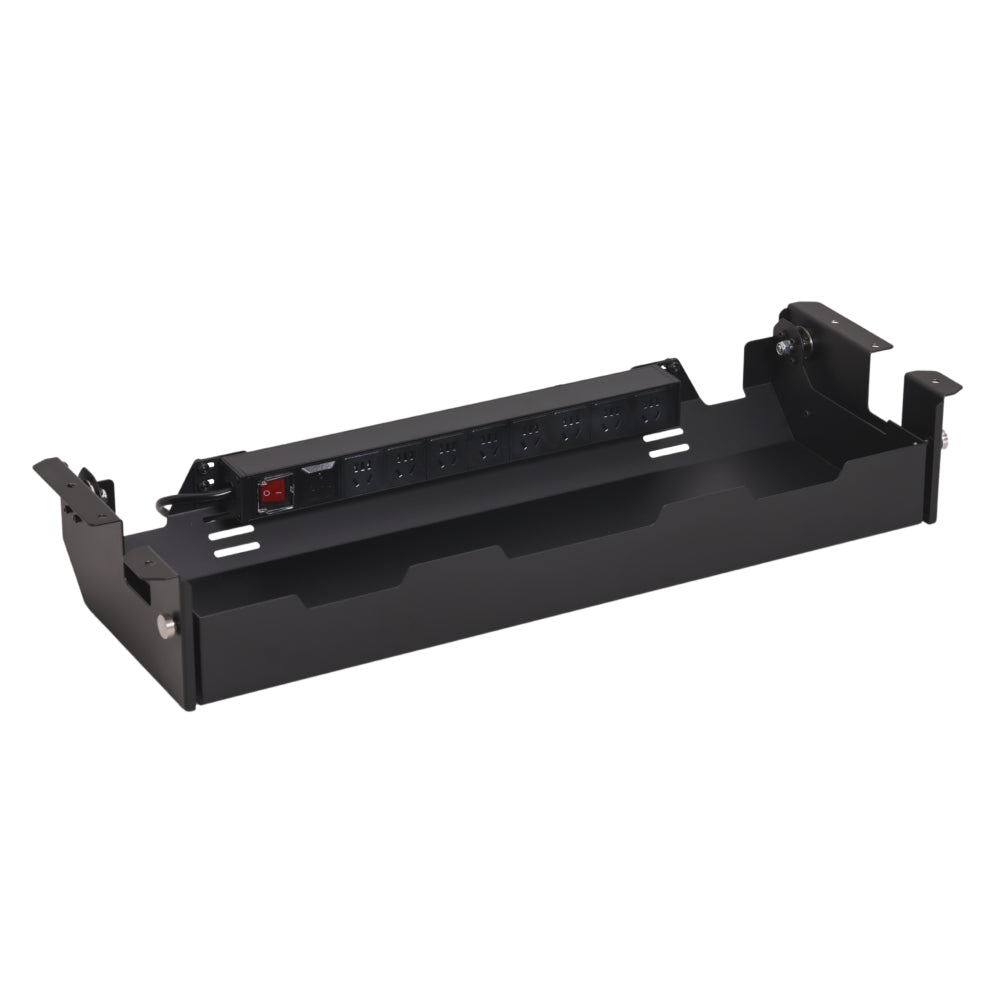
Die Hexcal Untertisch-Kabelführungswanne sorgt für Ordnung am Arbeitsplatz und wertet gleichzeitig Ihr Schreibtisch-Setup auf. Mit ihrem schlanken, minimalistischen Design organisiert sie nicht nur Kabel effektiv, sondern trägt auch zur Gesamtästhetik Ihres Arbeitsplatzes bei. Das vielseitige Design ermöglicht flexibles Kabelmanagement aus jedem Winkel und sorgt so für eine saubere und effiziente Einrichtung.
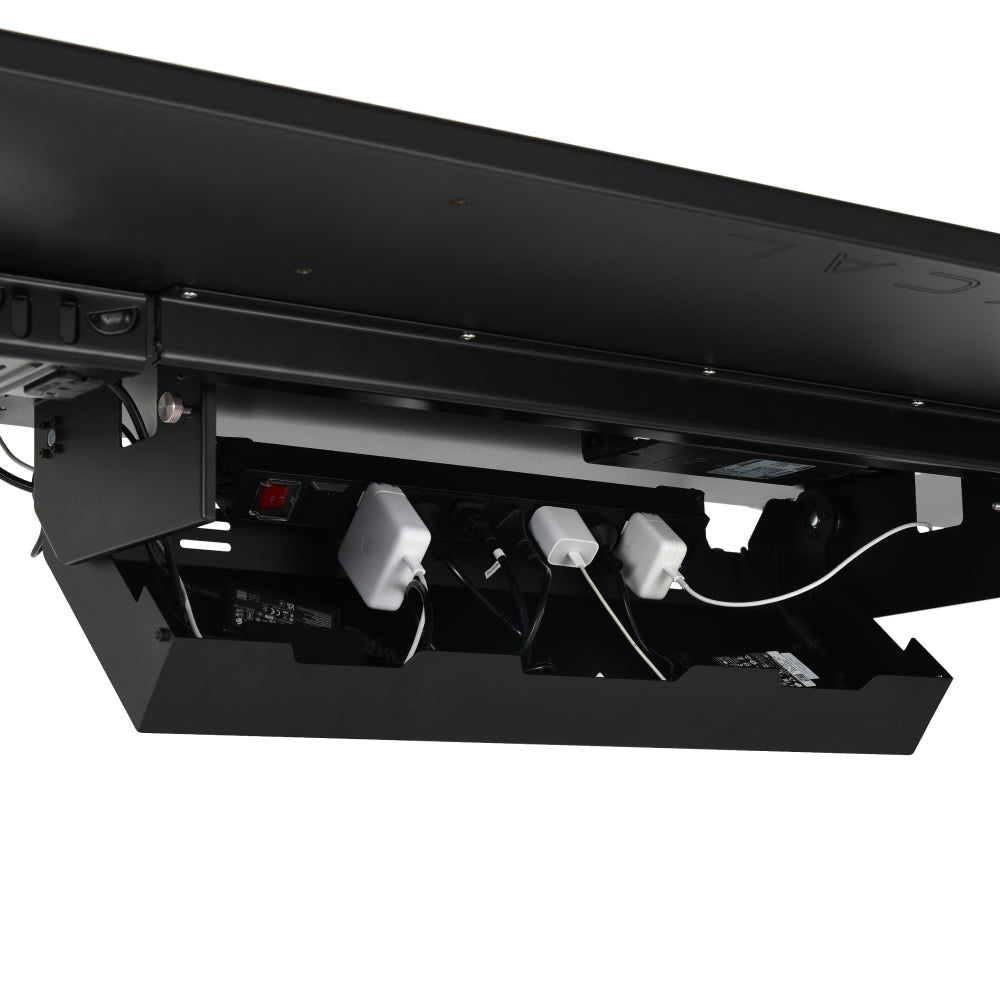
Die Installation ist kinderleicht: Befestigen Sie es einfach mit vorgebohrten Löchern am Hexcal Elevate Stehpult oder montieren Sie es mit einfachem Werkzeug auf einer Holztischplatte (dicker als 2,5 cm). Um Ihren Arbeitsplatz noch effizienter zu gestalten, verfügt das Fach über eine industrietaugliche 8-Sockel-PDU, die an mehreren Stellen positioniert werden kann und ein effizientes Kabelmanagement für alle Ihre Geräte ermöglicht.
Hinweis: Derzeit in den USA ausverkauft. Die nächste Lieferung wird in 4–6 Wochen erwartet. Jetzt in Kanada, Mexiko, der EU und den VAE erhältlich.
WICHTIGSTE SPEZIFIKATIONEN
VERSAND UND RÜCKSENDUNGEN
Versandhinweis für die USA: Dieser Artikel ist in den USA derzeit nicht vorrätig und wird voraussichtlich bis zum 25. September versendet.
Versand:Der Standardversand dauert in der Regel 2–5 Werktage. Lieferzeiten und -kosten können je nach Versandart und Zielort variieren.
Rückgabe & Umtausch: Sie haben ab Lieferdatum 30 Tage Zeit, einen Umtausch oder eine Rückerstattung zu beantragen. Die Artikel müssen unbenutzt, in Originalzustand und in der Originalverpackung sein.
Verbessern Sie Ihr Setup mit dieser hochwertigen Kabelwanne aus Stahl und Aluminium. Sie bietet ein großzügiges, 700 x 200 x 80 mm (L x B x H) verstecktes Fach in einem eleganten, minimalistischen Design, das für optimale Ordnung an Ihrem Arbeitsplatz sorgt.
Verabschieden Sie sich von einem aufgeräumten Schreibtisch mit Kabelsalat darunter. Ideal für Profis und Gamer: Diese Kabelwanne bündelt im Handumdrehen die sperrigen Adapter und Kabel Ihrer Multi-Geräte-Umgebung und sorgt so für Ordnung auf Ihrem Schreibtisch.

Wir liefern die PDU mit dem Stecker, der den elektrischen Normen Ihres Ziellandes entspricht.


Technische FAQ
Bieten Sie weitere PDU-Modelle für andere Länder oder Regionen an?
Ja, wir können die Kabelkanal-Lösung mit verschiedenen PDU-Steckdosentypen an die Standards Ihres Landes oder Ihrer Region anpassen, einschließlich EU-, UK- und AU-Typen. Bitte beachten Sie, dass die Anpassung und der Versand außerhalb der USA eine Lieferzeit von 1–2 Monaten erfordern können. Aufgrund der Größe von UK Steckdosen verfügt die britische Version der PDU über 6 Ausgänge anstelle von 8.
Kann ich eine Kabelmanagementwanne auf einem Nicht-Hexcal-Schreibtisch installieren?
Ja, dieHexcal Kabelmanagement-Ablage ist universell kompatibel. Sie verfügt zwar über vorgebohrte Befestigungslöcher für den Hexcal Elevate Stehschreibtisch, kann aber auch auf jeder Tischplatte aus Massivholz, Bambus oder MDF (Verbundwerkstoff) montiert werden. Für einen sicheren Halt sollte Ihre Tischplatte mindestens 20 mm dick und groß genug für die Montage der Ablage sein (79 cm L x 25,7 cm B). Die Montage der Ablage ist mit handelsüblichen Holzschrauben und einem Schraubendreher oder einer Bohrmaschine einfach und macht sie zur idealen Kabelmanagement-Lösung für jedes professionelle Büro oder Gaming-Setup.
Wie groß ist der Abstand zwischen der Ablage und der Tischkante, wenn sie montiert ist? Ich befürchte, dass ich nicht genügend Platz für die Klemmen meines Monitorarms habe.
Was ist der Unterschied zwischen einer Metallrinne und einem Maschenkabelnetz?
Ja. Die Hexcal Stromverteilungseinheit (PDU) ist eine industrietaugliche Stromversorgungseinheit, die speziell für Hochleistungs-Workstations entwickelt wurde. Sie ist für 1875 W (15 A) ausgelegt und bietet damit mehr als genug Reserve für Gaming-PCs mit hohem Stromverbrauch, mehrere 4K-Monitore und Studioequipment. Neben dem standardmäßigen Überspannungsschutz verfügt sie über eine interne Abschirmung zur Reduzierung von EMI/RFI-Störungen, wodurch sichergestellt wird, dass Ihre Hardware mit sauberem Strom versorgt wird und audiovisuelle Interferenzen vermieden werden. Das robuste Stahlgehäuse bietet zudem eine überlegene Wärmeableitung und erhöhte Brandsicherheit im Vergleich zu Kunststoff-Steckdosenleisten.
Kann ich einen Monitorarm mit einer unter dem Schreibtisch installierten Kabelrinne verwenden?
Ja, die Hexcal-Ablage ist mit den meisten Monitorarmen vollständig kompatibel. Sie ist so konzipiert, dass sie sich bei der Installation flexibel positionieren lässt. Ob Sie eine C-Klemme oder eine Kabeldurchführung verwenden – Sie können die Ablage leicht von der Tischkante absetzen, um den nötigen Freiraum für die Montagevorrichtung zu schaffen. Diese Konfiguration ist ideal für Einzel-, Doppel- oder Dreifachmonitore, da Sie die Kabel direkt vom Monitorarm in die Ablage führen können und so störende Kabel hinter dem Schreibtisch vermeiden.
Kann ich die Ablage nach vorne oder nach hinten ausrichten?
Ja, die Hexcal-Kabelablage verfügt über ein bidirektionales Montagesystem. Je nach Rahmenkonstruktion Ihres Schreibtisches und Ihren persönlichen Vorlieben können Sie die Ablage mit der Öffnung nach vorne für häufigen Kabelzugriff oder zur Wand für maximale Kabelführung montieren. Diese Flexibilität ist besonders wichtig für Schreibtische mit zentralen Querträgern oder geringer Tiefe an der Unterseite. So können Sie die Kabelführung unabhängig von der spezifischen Architektur Ihres Schreibtisches optimieren.
Wie viele Geräte kann ich über die Hexcal Kabelmanagement-Schiene mit Strom versorgen?
Ja, die Hexcal-Kabelrinne wurde mit besonderem Augenmerk auf Sicherheit für Haushalte mit Kindern und Haustieren entwickelt. Sie verfügt über sichere Verriegelungsmechanismen auf beiden Seiten, die die Stromverteilereinheit und die Kabel vollständig umschließen. Diese Konstruktion verhindert, dass neugierige Hände oder Pfoten an Kabeln ziehen oder stromführende Steckdosen berühren, und schützt so Ihre Familie und Ihre Arbeitsgeräte.
Ja. Die Hexcal-Kabelbox verfügt über ein offenes Belüftungssystem, das die Wärmeabfuhr von den Netzteilen ermöglicht. Eine optimale Luftzirkulation ist entscheidend, um thermische Drosselung bei Hochleistungsnetzteilen zu verhindern – ein Merkmal, das bei geschlossenen Kabelboxen aus Kunststoff oft fehlt.
Overall rating: 4.7380953 / 5 from 42 reviews.
Review topics: [].
"This is my second purchase of the Hexcal, and I realized once again why you should buy it haha. Cable management is solved so neatly, and I highly recommend it to anyone who is still deciding!!!"
"My previous desk did have a power strip organizer, but I used to have to crawl under the desk and bend my head down to organize things. What I was most satisfied with was that this one comes standard with an 8-outlet surge-protected power strip and features a free-stop hinge, so I could organize things even while sitting in my chair by raising the motion desk a little. Just like the shelf, this was easy to assemble as the nuts were embedded in the top plate."
"The packaging was neat and the package arrived sturdy. I bought the black one and this time bought the white one as well, and as expected, they are very pretty and great!"
"The packaging was excellent."
"It can be opened and reached. You can choose the direction. The interior space is spacious."
"I'm satisfied. I think it was a pretty good choice. 🙂 Thank you!"
"It's really good. The design is pretty too."
"Solidly made and high quality."
"I had a ton of gear that needed to come together for my new studio desk. . . and it had to be super clean. The Hexcal cable management tray was the perfect solution. Very spacious. I was even able to adjust the positioning of the power strip to fit my unique needs. Super clean. Very accessible. Great access. 10/10"
"The finish is a bit disappointing. I use all Hexcal products and know it's a brand with good finishing, but this one is a bit. . ."