Monitor Stand for Desk: Why a Riser Is Infrastructure, Not a Wooden Shelf

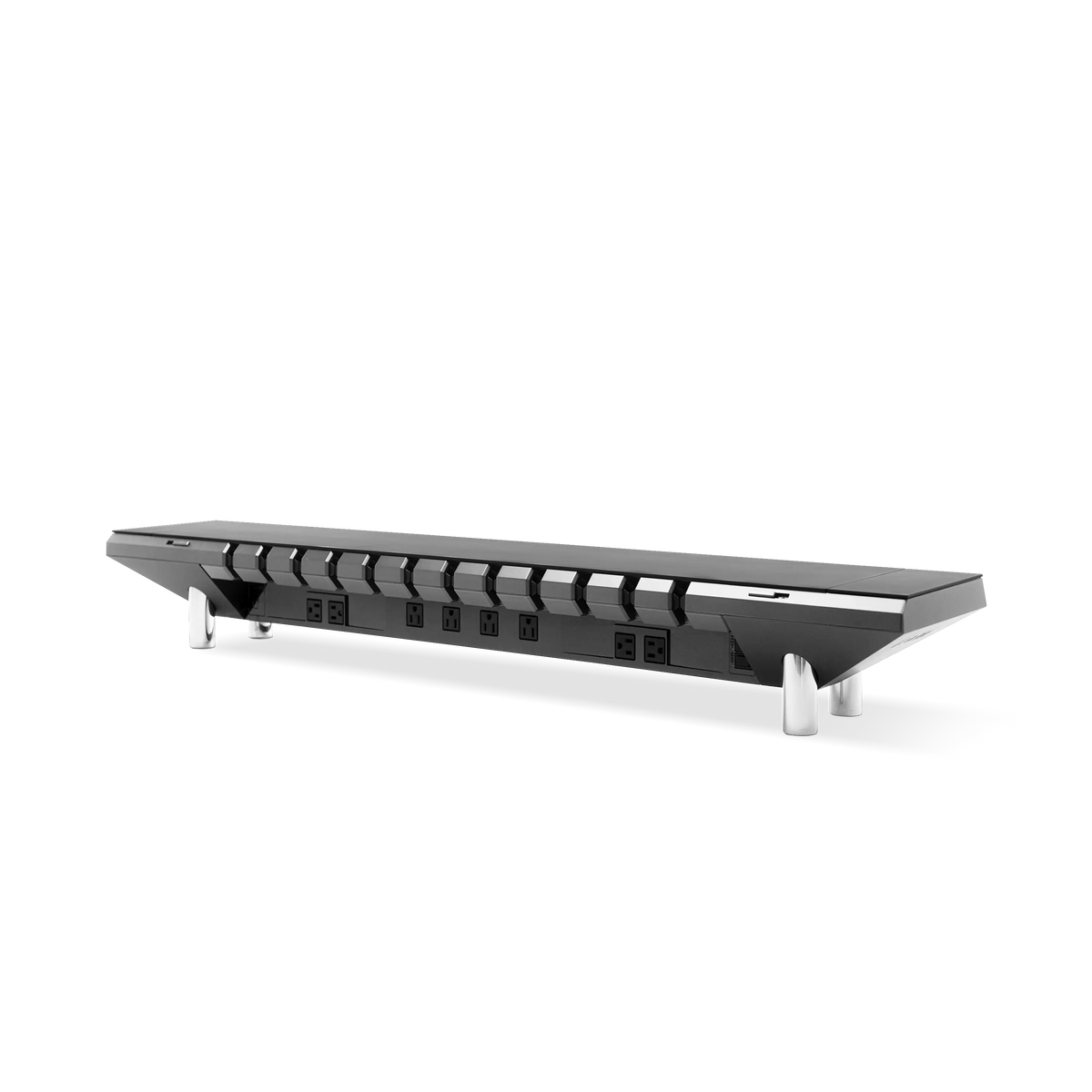
Most buyers shopping for a monitor stand for desk are really shopping for two inches of height. They picture a slab of walnut or a bent steel shelf, slide the screen up, and call the desk "tidy." That is aesthetic subtraction. The clutter is still there, just stacked underneath a nicer surface. A monitor stand is not a decorative riser you set a screen on; it is the one piece of desk hardware that sits at the exact intersection of ergonomics, power, and cable routing. Treated as infrastructure, it does three jobs at once. Treated as furniture, it does one job badly and leaves the other two to a tangle of adapters behind your desk. The Hexcal Studio was engineered around that distinction, and this guide walks through the three phases that separate a real workstation core from a shelf.
Key Takeaways
- A monitor stand for desk solves three problems, viewing height, power delivery, and cable concealment, and a plain wooden riser only addresses the first.
- OSHA's workstation guidance puts the top of the screen at or slightly below eye level, with the center 15 to 20 degrees below horizontal. A fixed riser only hits that for one specific monitor size and one specific person.
- An integrated stand like the Hexcal Studio routes power and data through a single chassis, so the "tidy" surface stays tidy instead of hiding a mess underneath.
- Choose a riser if you want height alone and never touch the cables again. Choose an integrated stand if the desk is a daily working surface that needs power at the deck.
- This approach does not fit a floating wall-mounted shelf with no usable underside. That setup needs a clamp-on arm instead.

Phase 1: Lift, Ergonomics Is a Range, Not a Fixed Height
The first job of any monitor stand for desk is to put the screen where your neck wants it. According to OSHA's Computer Workstations eTool, the top of the monitor should sit at or slightly below eye level, with the screen center 15 to 20 degrees below horizontal and a viewing distance of 20 to 40 inches. That is a precise target, and it is exactly where fixed risers fall short. A solid wooden shelf adds one height, say two inches, which is correct for one monitor size and one person's seated eye line. Change the monitor, change the chair, or share the desk, and that fixed lift is now wrong.
This is why we treat lift as a range problem rather than a slab problem. The Hexcal Studio holds the screen at a deliberate height while keeping the deck below it usable. For setups that need true adjustability, the Single Monitor Arm is rated for screens up to 35 inches and 3 to 11 kg, with a tilt range of +60 to -60 degrees, so you can dial the angle to your actual eye line instead of the manufacturer's guess.

Phase 2: Power, The Riser Is Where Your Cables Already Converge
Look at where every cable on your desk is heading. The monitor's power and video, the laptop charger, the dock, and the desk lamp all converge at the back of the screen. That convergence point is the single most valuable real estate on the desk, and a wooden shelf wastes it. A monitor stand for desk that ignores power forces you to run a separate power strip on the floor, which is the exact tangle the "tidy" shelf was supposed to fix.
Integrating power into the stand is the move competitors building walnut shelves and bare steel risers structurally cannot make. The Hexcal Studio Plus integrated power bridge brings outlets and USB to the deck where the devices live, so a phone, a keyboard, and a dock all charge at the surface instead of snaking down to the floor. The practical win is not the spec sheet. It is that the free socket lives where your hand already is, not on the floor behind the desk.

Phase 3: Conceal, Hiding Cables Is Where Risers Quietly Fail
Concealment is the phase that decides whether a desk stays tidy in week ten or just looked tidy in week one. A flat riser has no chamber to hide anything; the cables drape over the back edge in full view. A stand built as infrastructure has a routing path, a service loop the cords disappear into between the screen and the deck. This is the difference between cable management you do once and cable management you redo every time you add a peripheral.
If you want to go deeper on the routing logic itself, our desk cable management guide covers the full phased approach. The short version for a monitor stand: every cable should have one deterministic exit, not a fan of loose ends. The Studio's chassis was designed so the power, video, and USB lines share that single exit rather than competing for the back lip of a shelf.
The Structural Reality: A Riser Holds Load, So Build It Like It Does
A monitor is not a decorative object, and the stand under it is a load-bearing component. A 32-inch panel plus its base is real mass cantilevered over a thin shelf edge, and a soft wooden riser flexes under it over time. This is where the "furniture" framing breaks down. For heavier or ultrawide screens, a fixed shelf is the wrong tool entirely. The Hexcal Heavy Duty Monitor Arm is rated for displays up to 57 inches and a flat-panel load of 2 to 27 kg (22 kg curved), with VESA support up to 200x200, precisely because that mass needs a structural mount, not a plank.
The honest boundary here: this product requires two people for installation, and it is built for single large displays. For two, three, or four screens, the load math changes again and the Monitor Mount System is the right answer. A good buyer's question is never "which riser looks nicest." It is "what load am I actually putting on this, and is the support rated for it."

Riser vs Integrated Stand: A Quick Comparison
The market splits cleanly into two philosophies. One sells a surface; the other sells a system. Neither is wrong for every desk. They answer different questions.
| Dimension | Plain Wooden / Steel Riser | Integrated Stand (Hexcal Studio) |
|---|---|---|
| Viewing height | Fixed, one size | Engineered seated height + arm options |
| Power at the deck | None, needs a separate strip | Built-in power bridge (Studio Plus) |
| Cable concealment | Drapes over back edge | Single-exit routing chamber |
| Load handling | Flexes under heavy panels | Engineered chassis; arm for >27 kg / ultrawide |
| Best for | Light screen, height only | Daily working desk needing power + routing |

Who Should Buy Which
For a transparency note: Hexcal Studio, Studio Plus, and the Monitor Arm line are products we design and build. This is not a neutral third-party roundup, and the recommendations here favor an integrated approach because that is the problem the company set out to solve. With that stated plainly, here is the honest split. If your screen is light, you never reconfigure, and you genuinely only want two inches of height, a plain riser is a fine, cheap answer and you should not overpay for infrastructure you will not use.
If the desk is a daily working surface, power-hungry, peripheral-heavy, shared, or just something you want to stay tidy past the first month, then a monitor stand for desk that integrates lift, power, and concealment earns its place. That is the case the Hexcal Studio Plus was built for, and it is the one worth looking at closely before you settle for a shelf.
Final Thought
A monitor stand is not the last accessory you add to a desk; it is the first piece of infrastructure you build the desk around. The wooden shelf and the engineered stand are not short-lived tech accessories competing on looks. One is decoration, the other is the chassis your workstation runs on. When the riser stops being something you set a screen on and starts being where power, height, and routing all resolve, the desk stops being tidy by accident and starts being tidy by design.
By the Hexcal team.