Soporte para portátil ergonómico de escritorio: una torre de altura de 3 niveles que supera la vida útil del dispositivo

La mayoría de los artículos sobre soportes para laptops tratan el producto como el héroe. Escriben las mismas cuatro características: ajustable, plegable, de aluminio, ventilado, y lo llaman ergonomía. El soporte en sí rara vez es la variable que decide si una configuración es cómoda. Lo es la altura de la pantalla en relación con la línea de visión sentada. Un soporte para laptop para la ergonomía del escritorio solo es útil cuando se integra en un sistema vertical coherente, no cuando eleva un MacBook 90 mm de forma aislada.
Esta guía replantea el soporte para laptop como el nivel intermedio de una pila ergonómica de tres niveles: silla, laptop como pantalla secundaria y monitor externo. Muestra dónde el soporte se gana su lugar, dónde debe retirarse y por qué una plataforma de inversión como el elevador de monitor Hexcal Studio puede hacer que el nivel de la laptop desaparezca por completo en el escritorio.
Conclusiones clave
- Un soporte para laptop para la ergonomía del escritorio es el nivel intermedio de una pila de altura de 3 niveles. La línea de visión sentada, la línea central de la pantalla activa y la superficie del teclado tienen cada una una altura objetivo, y el soporte solo corrige una de ellas.
- La mayoría de los "soportes ergonómicos para laptop" venden la ajustabilidad como la característica principal. En una típica combinación de laptop más monitor, un soporte de altura fija de alrededor de 90-120 mm cubre el caso común sin piezas móviles.
- Cuando la laptop se convierte en la pantalla secundaria debajo de un monitor externo, el soporte para laptop a menudo sale por completo del escritorio. Un elevador o brazo de monitor asume el trabajo de apilamiento de altura.
- El elevador de monitor Hexcal Studio y el brazo de monitor único Hexcal están diseñados para esa pila de doble pantalla. Pertenecen a la misma conversación de decisión que el soporte, no como accesorios secundarios, sino como infraestructura ergonómica.
- Este marco no se aplica a configuraciones completamente móviles (mesa de cocina, cafetería, escritorios compartidos). Allí, la laptop es la pantalla principal y un elevador portátil es el único ancla ergonómica disponible.

Por qué un soporte para laptop para la ergonomía del escritorio rara vez resuelve la ergonomía por sí solo
Busque cualquier resumen de "soporte para laptop para la ergonomía del escritorio" y la primera frase suele prometer alivio para el dolor de cuello. La premisa es semi-correcta. Las laptops usadas planas sobre un escritorio fuerzan el cuello a una flexión hacia adelante sostenida, y cuanto más abajo esté la pantalla de la línea de visión sentada, más pagará la columna cervical. Elevar la pantalla a la altura de los ojos es el instinto correcto.
El error es tratar la laptop como la pantalla principal. En el momento en que un monitor externo entra en la configuración, la laptop deja de ser la referencia de la línea de visión y se convierte en una superficie secundaria para el teclado y el chat, a menudo colocada debajo del monitor principal. Un soporte para laptop que eleva la laptop 90 mm entonces choca con la base del monitor u oculta el teclado de la laptop.
Esta colisión es invisible en las reseñas de productos porque los revisores prueban el soporte para laptop en un escritorio vacío. Los escritorios reales tienen un monitor, un teclado, una alfombrilla y un canal para cables. El soporte debe coexistir con todos ellos, no dominar.

La pila de altura de 3 niveles: silla, laptop, monitor
En lugar de evaluar un soporte para laptop como una compra aislada, evalúelo como el centro de un sistema vertical de 3 niveles:
- Nivel 1, línea de visión sentada. Determinada por la altura del asiento de la silla más la longitud de la pierna. Es la referencia fija a la que todo lo demás se alinea.
- Nivel 2, superficie de pantalla activa. Cualquier pantalla que el usuario mire con mayor frecuencia debe estar a la altura de la línea de visión sentada. Esa es la pantalla de la laptop en un día de una sola pantalla, y el monitor externo en un día de doble pantalla.
- Nivel 3, superficie del teclado. Debe estar a la altura del codo cuando se está sentado. El teclado de la laptop no puede ser el Nivel 2 y el Nivel 3 a la vez, y ese es el conflicto estructural que se le pide resolver al soporte para laptop.
Una vez que se nombra la pila, el soporte para laptop tiene un papel claro: llevar la pantalla de la laptop al Nivel 2 sin empujar el teclado de la laptop por encima del Nivel 3. Si un soporte no puede satisfacer ambos, está resolviendo el nivel incorrecto.

Nivel 1: Cuando un soporte para laptop para escritorio realmente ayuda
El soporte ayuda en exactamente un escenario. La laptop es la pantalla principal para la jornada laboral, y no se usa ningún monitor externo. Esto cubre a escritores, viajeros en una configuración de mesa de cocina y días de revisión y respuesta sin multitarea pesada. En ese caso, el soporte para laptop debe elevar la pantalla para que su borde superior quede a la altura de los ojos sentados.
Para la mayoría de las laptops de 14", la plataforma normalmente necesita elevarse entre 90 y 120 mm por encima de la superficie del escritorio para lograrlo. Un soporte de altura fija en ese rango cubre el caso común de laptop sin ningún ajuste. Los soportes ajustables agregan rango, pero introducen tambaleo, piezas móviles y un segundo mecanismo que puede fallar. Ese no es el tipo de inversión en infraestructura que una configuración de escritorio a largo plazo debería hacer. Al igual que la gestión de cables, el soporte para laptop se beneficia de ser especificado una vez y olvidado.

Nivel 2: la colisión de doble pantalla y por qué el soporte debe salir del escritorio
Una vez que un monitor externo de 27" o 32" entra en la configuración, la laptop se convierte en una superficie secundaria. El patrón dominante es el monitor en el Nivel 1 y la laptop debajo como una superficie de chat y teclado. El soporte para laptop entonces tiene que despejar la huella del monitor o dejar de usarse.
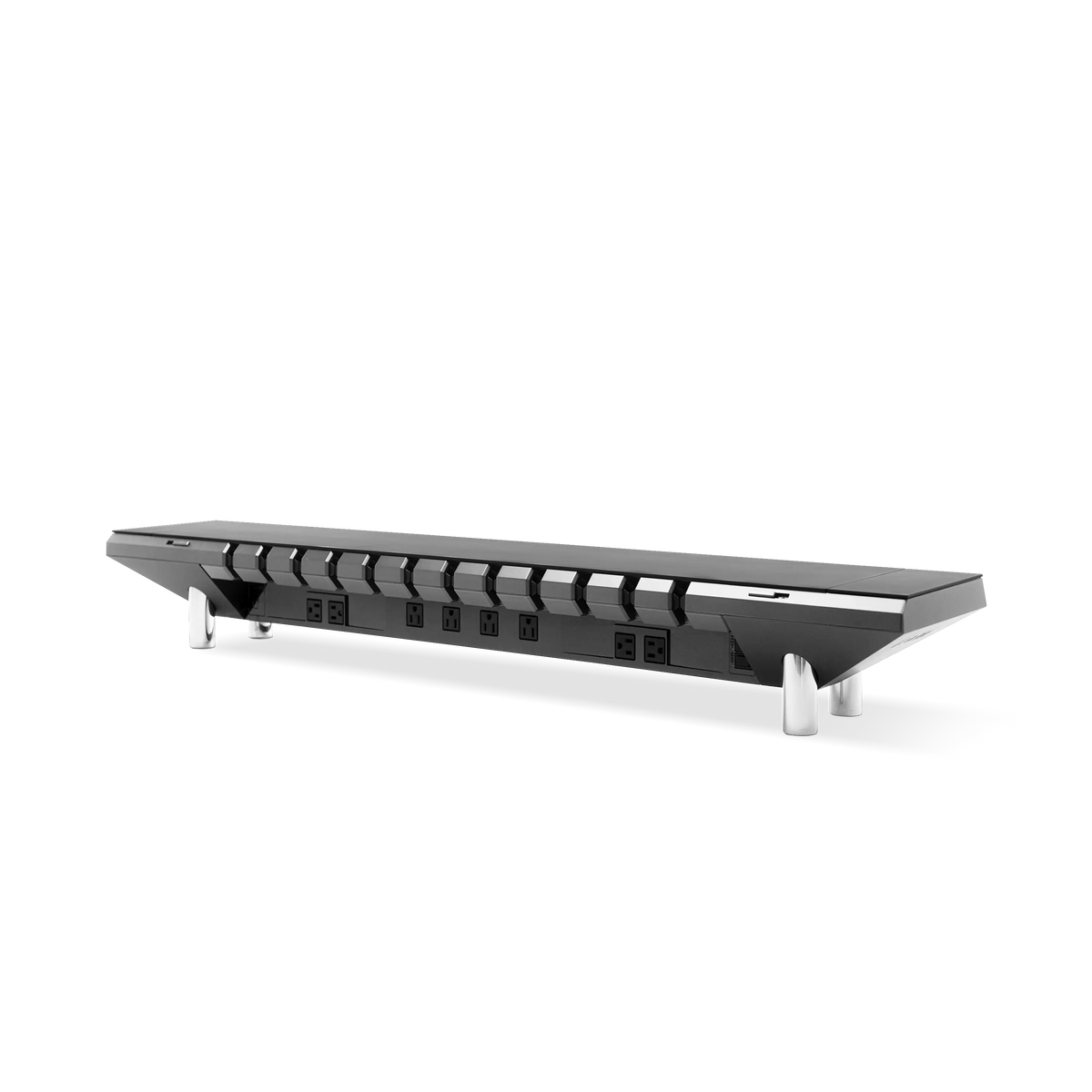
Para este caso de doble pantalla, la mejor compra ergonómica es un elevador de monitor que levante la pantalla externa a la altura de la línea de visión sentada, con la laptop estacionada directamente en el escritorio debajo. Ese es el argumento estructural para el elevador de monitor Hexcal Studio, un chasis de precisión con 1.440 W de potencia distribuida, gestión de cables integrada y un puerto USB-C PD de 27 W, que convierte el elevador en un centro de infraestructura a nivel de escritorio en lugar de un soporte de un solo propósito. Para saber cómo el elevador se integra con la pila de energía y enrutamiento más amplia, nuestra guía de gestión de cables de escritorio cubre la ingeniería en detalle.
El soporte para laptop sale del escritorio en este escenario. Forzar ambas pantallas a la misma altura mediante apilamiento es el error más común en las configuraciones de doble pantalla, y produce lo peor de ambos mundos: una pantalla de laptop aún por debajo de la línea de visión y una base de monitor ahora fuera del escritorio.
Nivel 3: Cuando un brazo de monitor individual es la mejor inversión
Para los usuarios que alternan entre días de solo laptop y días de doble pantalla, un brazo de monitor individual, no un soporte para laptop, es la inversión ergonómica de mayor uso. El brazo eleva el monitor externo a la altura de los ojos en segundos, liberando la pantalla de la laptop para que quede plana sobre el escritorio. En los días de solo laptop, el brazo se mueve a un lado, y la laptop se convierte en la superficie activa de Nivel 2.
Por eso, el brazo de monitor único de Hexcal, diseñado para pantallas de hasta 35" y de 3 a 11 kg, con montaje VESA de 75×75 y 100×100, instalación de abrazadera (escritorio de 10-80 mm) o de ojal (10-35 mm), inclinación de ±60° y giro de ±90°, pertenece a la misma conversación de decisión que cualquier soporte para laptop. El brazo es el mecanismo de ajuste ergonómico para la pantalla dominante, y la laptop se convierte en la superficie para el teclado y el chat debajo. Un soporte para laptop que es útil durante dos horas a la semana no vale la pena el espacio que ocupa en el escritorio.
Para escritorios donde el usuario desea elevar ambas pantallas a la vez, un requisito más raro impulsado por trabajos críticos para el color o configuraciones de trading, una plataforma insignia como el Hexcal Studio Plus plateado combina su puerto USB-C PD de 100 W con el apilamiento de altura del elevador más el brazo, manteniendo la gestión de cables y la energía centralizadas.

Anti-impulso: lo que el mercado de soportes para laptops no te dirá
El mercado de soportes para laptops funciona con reemplazos. Los soportes de aluminio se doblan bajo laptops de 2 kg, los soportes de plástico se agrietan en la bisagra, los soportes plegables pierden su memoria de ángulo en un año. El soporte para laptop es más parecido a un accesorio que a un gadget, y así debería comprarse. Olvídate de los soportes plegables de compra impulsiva y los elevadores de diez dólares que llegan doblados. El costo de una segunda compra más el envío supera la diferencia de precio de un primer soporte correctamente especificado.
Para los usuarios móviles, un soporte portátil delgado de bambú o aluminio con una elevación fija de 90 mm es la única pieza de infraestructura ergonómica que sobrevive al empaquetado diario. Cualquier cosa ajustable, por definición, se ajustará a diario, y el ajuste diario se convierte en fricción diaria. Construido para durar y a prueba de futuros para la laptop del próximo año es la lente de especificación correcta para el soporte de la laptop, no la densidad de características.
Consideraciones finales: Construye la pila, compra el nivel
Un soporte para laptop para la ergonomía del escritorio es un nivel, no un héroe. El elevador de monitor Hexcal Studio, el brazo de monitor único Hexcal y un soporte para laptop correctamente especificado son tres herramientas para un mismo trabajo: alinear la línea de visión sentada, la pantalla activa y la superficie del teclado para un trabajo prolongado frente a la pantalla. Elige el nivel que tu flujo de trabajo realmente necesita y resiste el impulso de elevar la laptop por encima de la pantalla que el usuario está mirando.
Si el escritorio es predominantemente de doble pantalla, invierte en el Hexcal Studio Plus plateado o el brazo de monitor único Hexcal y deja la laptop plana. Si la laptop es la pantalla principal, especifica un soporte fijo de 90-120 mm y deja de ajustarlo. De cualquier manera, construye la pila una sola vez.
Por el equipo de Hexcal
Descargo de responsabilidad: Hexcal Studio, Hexcal Studio Plus y los brazos de monitor Hexcal mencionados en este artículo están diseñados y fabricados por Hexcal. Este artículo es informativo, no una revisión ergonómica independiente.